


Vokera Boiler Fault Codes Explained: Common Meanings, Safe Checks and Repair Advice
A Vokera fault code helps show where your heating appliance has found a problem. However, the exact meaning can depend on the model. Because of this, you should always check the code against the manual for your specific range.
Many Vokera warnings relate to ignition, water level, hot water sensors, flow sensors, return sensors, fan operation, flue safety, or electronic controls. Some are simple to check from outside the appliance. However, repeated warnings usually need a qualified engineer.
If the same warning keeps returning, arrange a professional repair rather than trying repeated resets.
What Do Common Vokera Fault Codes Mean?
The codes below cover many common Vokera ranges. Even so, model-specific guidance matters.
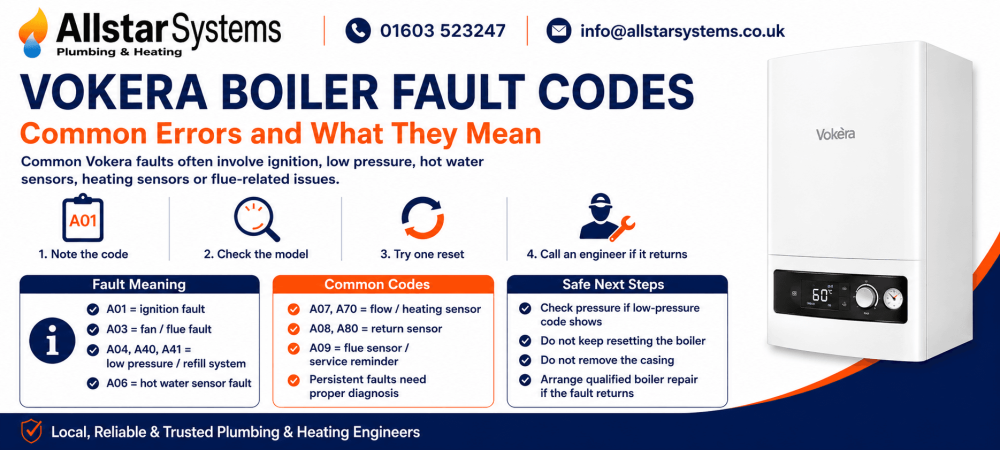
A01 usually points to an ignition or flame failure. The appliance has tried to light the burner but has not confirmed a flame.
A03 often relates to fan operation. On some Compact A models, it can indicate a fan tacho signal issue. Since the fan supports safe flue operation, this warning needs expert attention if it returns.
A04 and A40 usually relate to low water level inside the sealed heating circuit. A40 often means the appliance needs refilling.
On some newer Easi-Heat i models, A41 can act as an early warning before the level falls far enough to trigger A40.
A06 often relates to the domestic hot water thermistor on common A-code models. A60 can appear on other ranges, so always check the exact model guide.
A07 often points to the primary flow thermistor on common A-code models. A70 can appear on other versions, so the wording should stay model-aware.
A08 usually links to the return temperature sensor. It can also relate to a difference between outgoing and returning heating water. A80 can indicate a return probe issue on newer Easi-Heat i models.
A09 often relates to the flue thermistor or flue temperature monitoring. Some newer models use separate warnings for cleaning needs or heat exchanger condition.
What Should You Do First?
First, note the exact code on the display. Then, identify the model, as meanings can vary across Vokera ranges.
Next, check the user manual. If the manual allows a reset, try it once. If the warning clears and stays away, monitor the appliance.
However, if the same warning comes back, stop resetting it. Repeated resets will not fix a failed part, blocked route, or unsafe condition.
You could also check simple external items. For example, make sure the appliance has power. Check the timer, thermostat, programmer, and visible controls.
Important safety note: never remove the front cover. Do not inspect gas parts, fan parts, flue parts, wiring, PCB, pump, thermistors, or combustion areas yourself.
Common Vokera Warning Groups
Ignition and burner warnings
A01 belongs in the ignition group. It normally means the burner has not lit or the flame has not been detected.
This type of issue should not be treated as a water-level or hot water sensor problem. If it returns after one reset, book a professional diagnosis.
Water level and refill warnings
A04, A40, and A41 usually sit within the sealed circuit refill group. If one of these appears, check the gauge first.
If the reading is low and you know how to refill safely, top up to the correct range. However, if the level keeps dropping, there may be a leak or vessel problem.
Hot water sensor warnings
A06 and A60 often relate to domestic hot water temperature sensing. When this circuit fails, the appliance may not read tap-water temperature correctly.
If hot water becomes unstable or the warning returns, an engineer should test the thermistor and related wiring.
Flow and return temperature warnings
A07, A08, A70, and A80 often link to heating water temperature readings. These can involve flow or return thermistors, wiring, or control readings.
If radiators heat slowly, stay patchy, or develop cold areas, the wider heating circuit may also need checking after the appliance fault has been diagnosed.
Fan and flue safety warnings
A03 and A09 can involve fan operation, flue temperature, or safe discharge. These areas affect combustion safety.
Therefore, do not ignore repeat warnings in this group. Call a Gas Safe registered engineer if either code comes back.
Can You Fix Vokera Fault Codes Yourself?
You can do safe external checks only.
You can read the code, check the manual, confirm power, check controls, view the gauge, and try one approved reset. You can also look for obvious external issues, such as a switched-off fused spur.
For low sealed-circuit readings, you may refill if you understand the filling loop and the manual allows it. However, do not overfill.
Anything inside the case needs professional attention. This includes gas valves, burners, fans, flues, PCBs, wiring, pumps, and sensors.
When Should You Call an Engineer?
Call an engineer if the warning returns after one reset. You should also book help if the appliance locks out, loses heat, stops making hot water, or behaves unusually.
In addition, call for support if the code relates to ignition, fan operation, flue safety, hot water sensing, flow sensing, return sensing, or repeated water loss.
A professional could test the appliance safely and confirm the true cause.
How to Reduce Future Problems
Annual servicing helps keep your Vokera appliance safe and reliable. During a service, an engineer can inspect key parts, test operation, and spot early signs of wear.
Also, act quickly when small issues appear. A dropping gauge, noisy radiators, poor hot water, or uneven heat can point to a developing problem.
Early checks could prevent a minor warning from becoming a full breakdown.
Final Advice on Vokera Fault Codes
Vokera fault codes help narrow down the likely problem area. For example, A01 often relates to ignition. A04, A40, and A41 usually relate to low sealed-circuit readings. A06 and A60 can involve hot water sensing. A07, A08, A70, and A80 often point to flow or return temperature sensing. A03 and A09 can involve fan or flue safety.
However, a code is only a starting point. The safest next step depends on your model, symptoms, and whether the warning returns.
If a simple reset does not solve the issue, arrange a proper diagnosis. Regular servicing can also help protect safety, efficiency, and long-term reliability.
Vokera fault codes FAQs
What are the most common Vokera fault codes?
Some of the most common Vokera fault codes include A01 for ignition failure, A04 or A40 for low pressure, A06 for the domestic hot water sensor, A07 for the heating or flow sensor side, A08 for the return sensor side, and A09 for the flue temperature side.
Is Vokera A04 an overheat fault?
No. The safer and more accurate explanation is low system pressure, not overheating.
What does Vokera A06 mean?
It means there is a domestic hot water sensor problem.
What does Vokera A07 mean?
It points to the heating or flow sensor side and can also sit alongside an abnormal temperature difference between flow and return.
What does Vokera A08 mean?
It points to the return sensor side and can also relate to a higher than expected temperature difference between flow and return.
What does Vokera A09 mean?
It points to the flue temperature side and, on some control guides, can also act as a service reminder or indicate the heat exchanger needs cleaning.
What is Vokera A41?
On newer Vokera guidance, A41 is a transitional fill the system warning that appears before A40 if the pressure problem continues.
Do I need an engineer for repeated Vokera faults?
Yes. If the same code keeps returning after a reset, the fault usually needs proper diagnosis rather than repeated resets.